
How to Use AI Question Generation on Goloka
Designing good surveys and the right survey questions can sometimes take a lot of time. The Goloka’s AI Question Generation feature helps organisations, researchers, and businesses create professional, context-aware, high-quality, and relevant questions quickly. Simply enter your survey objective or theme, and the AI will generate relevant, high-quality questions that you can edit, accept, or delete, saving you valuable time while ensuring accuracy.
1. What is AI Question Generation?
AI Question Generation is a built-in tool in Goloka’s Survey Builder that automatically creates survey questions based on your survey’s title, description, and objectives.
2. Why it Matters for Organisations
This feature reduces the effort needed to design surveys and ensures you get professional-grade questions in seconds.
Key benefits include:
- Save time when creating surveys.
- Generate context-aware and relevant questions.
- Improve quality of surveys with well-structured questions.
- Fully editable. You stay in control of final wording.
3. Step-by-Step: Using AI Question Generation
Step 1: Start Your Survey
- Open the Campaigns → Create Campaign.
- Enter your survey title and description.
Step 2: Generate Questions
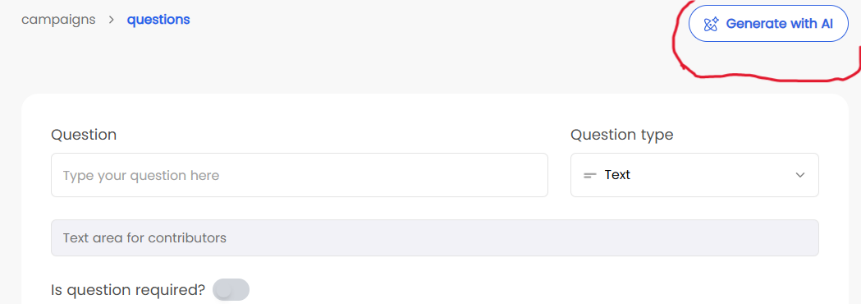
- Click on “Generate with AI”.
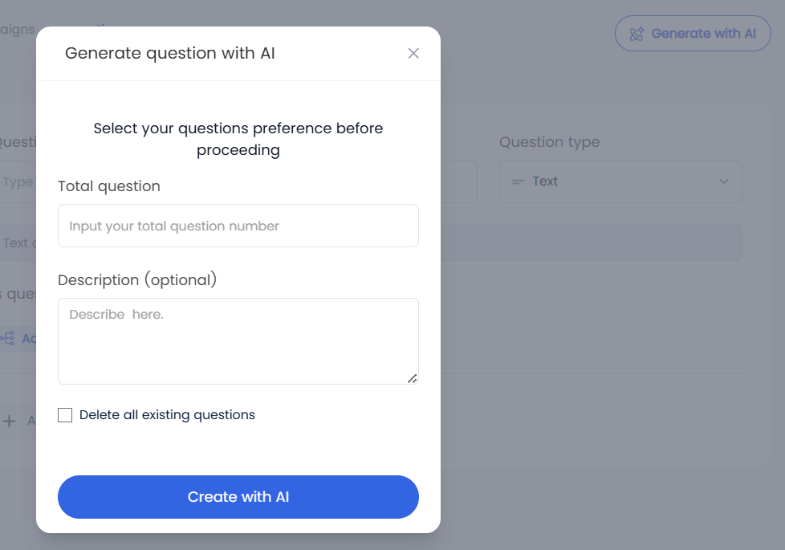
- Enter your survey theme or objective (example: “understanding youth employment challenges”)
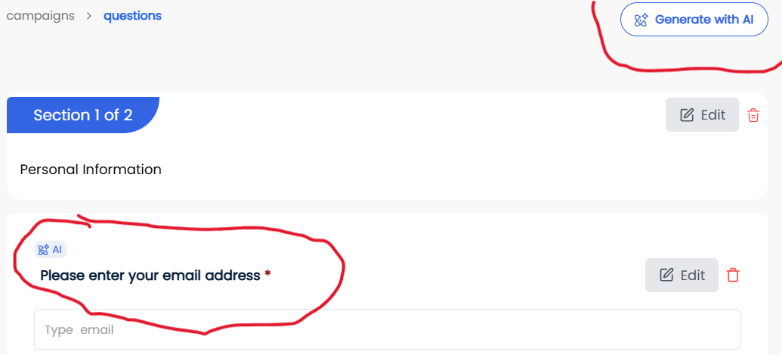
- AI will suggest a set of questions
Step 3: Review Questions
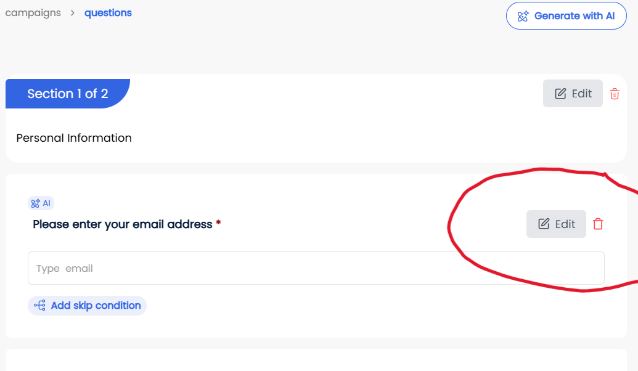
- Questions appear in your Survey Builder.
- You can accept, edit, or delete each question.
Step 4: Finalise Your Survey
- Once you’re satisfied, save survey or continue building the rest of your survey.
- Add custom questions if needed.
4. Tips for Smooth Use
- Be clear and specific when entering your survey objective for better results.
- Use AI as a starting point, but always review questions for context.
- Mix AI-generated and manual questions to speed up time.
5. Frequently Asked Questions
Do I have to use AI-generated questions?
No. They are suggestions, you can accept, edit, or delete them.
How accurate are AI-generated questions?
The questions are generated using your survey title, description, and objective, making them context-aware. You can always edit before finalising.
Can AI generate all types of questions (multiple choice, open-ended, etc.)?
Yes, but you can adjust the format inside the Survey Builder.
Can I use AI-generated questions for academic research survey?
Yes. AI-generated survey questions can support academic projects, policy research, and business insights survey.
Does AI replace human input?
No. The AI speeds up question drafting, but you remain in full control of editing and approving questions.
6. Contact/Support
For help with AI Question Generation, contact us at hello@goloka.io or call +234 (811) 666 5321